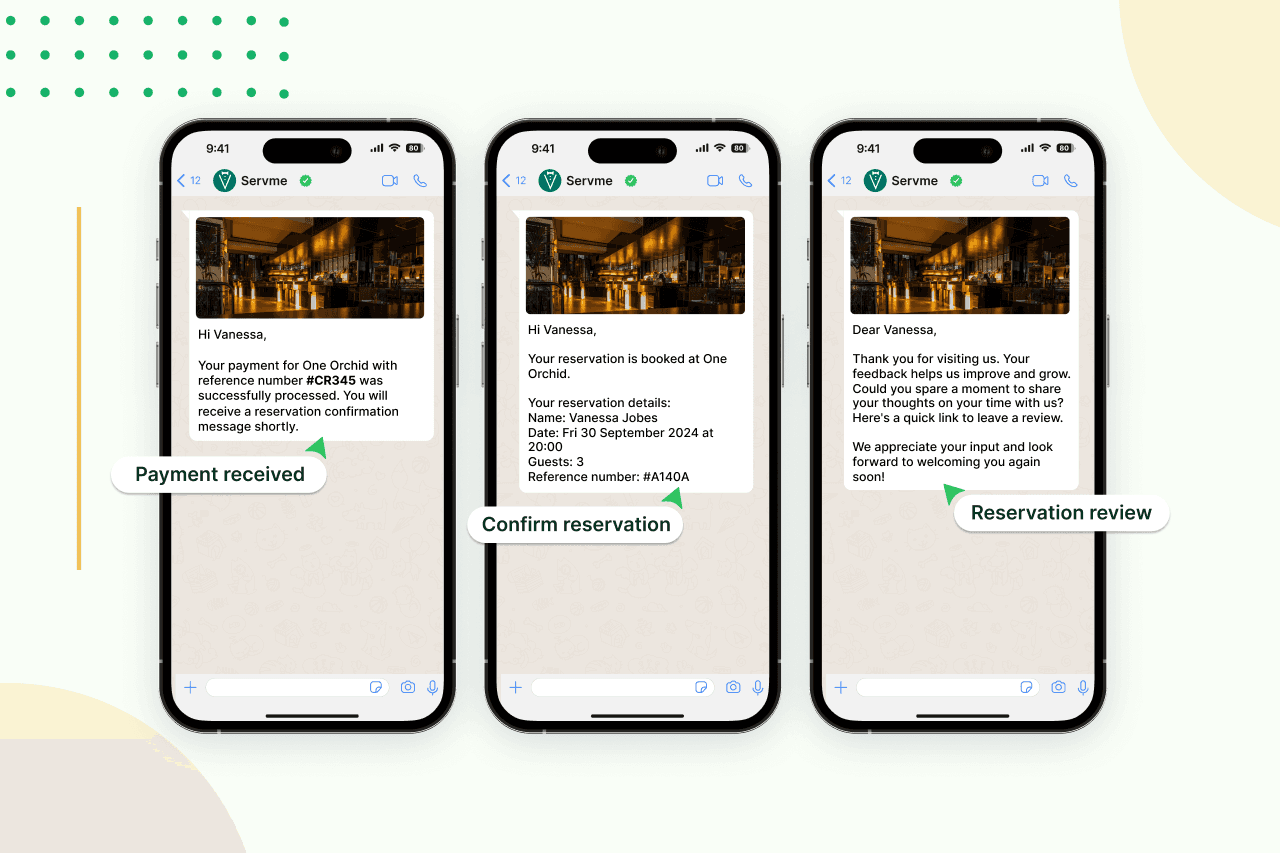
Most guest communication tools require the guest to check something: an email inbox, a booking app, a review platform. WhatsApp for restaurants works differently. It meets guests where they already are — on a channel they check dozens of times a day, with notifications on by default and messages that arrive directly alongside their personal conversations. That is a structural advantage that no other channel offers at the same level.
But the channel only performs as well as the messages you send through it. A poorly timed message, a generic template that doesn’t use the guest’s name, or a follow-up that arrives three days after a visit… These erode exactly the trust the channel builds. WhatsApp for restaurants is worth doing properly, which starts with getting the templates right.
The 13 templates below cover the full guest journey, from the first booking confirmation through to the post-visit follow-up. Each one is ready to adapt and use.
What Makes a Good Template
The best WhatsApp templates share a few characteristics that are worth noting before you customize anything.
- They are short: a WhatsApp message is not an email, and anything that requires scrolling will be skimmed at best.
- They carry a single message and a single action: one thing to know, one link to follow, one thing to do.
- They use the guest’s name: not “Dear guest” or no name at all.
- They are sent at the right moment: timed to when the message is relevant, not when it is convenient for the operator.
For hotel F&B teams, templates also need to account for the in-house guest experience: a confirmation or reminder that references the hotel by name, along with the restaurant or outlet, tells the guest they are dealing with a connected operation, not separate systems that don’t talk to each other.
All You Need to Know About WhatsApp and Sender ID
Templates 1–4: Reservation & Transactional
These are the highest-stakes templates because they are often the first direct communication a guest receives. A reservation confirmation is the first transactional touchpoint in the guest journey; it either builds confidence or introduces doubt. Prompt, clear, and correctly personalized is the standard to meet.
1. Welcome Message
Welcome to [restaurant name]. We’re glad to have you with us. Stay tuned for new menus, big events, and delicious offers. Follow us on [Instagram/social link] for a closer look at what we do.
2. Reservation Confirmation
Hi [guest name], your reservation at [restaurant name] is confirmed. [Number] guests, [date], [time]. We look forward to seeing you!
3. Cancellation Acknowledgment
Hi [guest name], we’ve received your booking cancellation for [date] at [restaurant name]. If you didn’t request this, please reply and we’ll sort it out right away. We hope to see you again soon.
4. Reservation Reminder
Hi [guest name], a quick reminder about your reservation at [restaurant name] on [date] at [time]. We’re looking forward to it. If anything has changed, reply here and we’ll update your booking.
Templates 5–9: Campaigns That Drive Covers
These templates are for moments when the restaurant is reaching out proactively rather than responding to a guest action. The standard is the same: specific, personal, and with one clear next step. Avoid generic promotional phrasing; if the template could have been sent by any restaurant in the city, it probably will not move anyone to book.
5. New Menu Announcement
Hi [guest name], we’ve just launched a new menu at [restaurant name]. New dishes, updated classics, and a few things worth coming back for. View the menu here [link] or book a table here [reservation link]. See you soon!
6. Location Message
Hi [guest name], here’s the fastest way to find us: [Google Maps link]. We’re at [address/landmark reference]. See you soon!
Use case: Send this as a standalone message after a confirmation for guests who are booking for the first time at a venue that is hard to find, or in a hotel where the restaurant location is not immediately obvious from the lobby.
7. New Branch or Venue Announcement
Hi [guest name], we’re opening a new [restaurant name] in [location] on [date]. Join us for the opening and get [offer]. Directions here: [Google Maps link].
8. Birthday Campaign
Happy birthday, [guest name]! The team at [restaurant name] would love to celebrate with you. Show this message to your host and enjoy [offer — e.g. a complimentary dessert]. Valid for one week from today.
9. Re-engagement Campaign
Hi [guest name], it’s been a while since your last visit to [restaurant name]. We’ve added some new dishes we think you’d enjoy. Book a table here when you’re ready [reservation link].
Templates 10–13: Offers, Events & Feedback
These four templates cover the remaining moments in the guest communication cycle: promotional offers, events, referrals, and post-visit feedback.
10. Special Event Invitation
Hi [guest name], you’re invited to [event name] at [restaurant name] on [date]. [One-line event description]. Reserve your place here [signup link]!
11. Special Offer or Discount
Hi [guest name], we have an offer for you this week: [specific offer — e.g., complimentary dessert, reduced price on set menu] when you visit [restaurant name] on [day(s)]. Book here [reservation link]!
Keep the offer specific. “A special offer” with no detail is not an offer — it is a tease that most guests will not follow up on.
12. Referral Campaign
Hi [guest name], if you know someone who would enjoy [restaurant name], refer them and get [reward — e.g., a complimentary starter on your next visit] for every friend who dines with us. Use this referral link: [link].
13. Post-visit Survey
Thank you for dining with us at [restaurant name], [guest name]. We hope you enjoyed your visit. If you have a moment, we’d appreciate your feedback to help us always get better: [survey link].
Getting the Frequency Right
WhatsApp for restaurants works because the channel is personal. It stops working — and starts costing you opt-outs — when that personal quality is overridden by volume. A guest who receives four messages in a week from a restaurant they visited once will not visit again.
The practical standard is one message per trigger event. A booking confirmation goes out when a booking is made. A reminder goes out 24 hours before. A post-visit message goes out within two hours of the visit ending. Campaign messages — new menus, events, offers — go to segmented lists, not the entire database. A hotel F&B team running multiple outlets should be especially careful here: a guest who books one outlet should not immediately receive promotions from three others.
The test for any template before it goes out is whether the guest receiving it would find it useful or intrusive. If it’s the latter, the template is right but the timing or segment is wrong.
Restaurant Customer Loyalty: Turning First-Timers Into Regulars
A Note on Personalization
Every template in this list includes a guest name field. That field is only useful if the data behind it is accurate. A WhatsApp message that arrives addressed to “[guest name]” because the variable did not populate is worse than no message at all. Before any campaign goes out, test the templates with real records from your CRM to confirm that personalization fields resolve correctly.
The Servme AI Playbook for Restaurants: A Practical Guide to AI Prompts
Servme’s guest communication tools handle WhatsApp delivery, with CRM-linked personalization and trigger-based automation. If you want to see how it works for your operation, book a free demo!