A guest searches for your restaurant on Google, decides it’s exactly what they want, and then hits a booking step that redirects them to a platform they’ve never heard of. Some of them follow through. Some close the tab and book somewhere else. That drop-off is invisible to you. The cover never arrives and you never know why.
Reserve with Google closes that gap. It places a direct booking button inside Google Search and Maps, so a guest who finds you can reserve without leaving Google. The reservation flows into your reservation management system in real time, commission-free and with no third-party redirect.
What Reserve with Google Is & What It Isn’t
Reserve with Google is a booking channel, not a booking platform. The guest finds your listing in Google Search or Maps, sees a “Reserve a Table” button, and completes the reservation inside Google’s interface. The booking lands in your dashboard in real time, tagged by source.
It also surfaces your listing in category searches. A guest searching “Italian restaurants near me” who hasn’t encountered your name before can find you, see your listing, and book, all without leaving Google. That discoverability is a separate channel from guests who already know you and search by name; it reaches people who are still deciding where to go.
Reserve with Google is available across 50+ countries — including the US, the UK, UAE, Saudi Arabia, Bahrain, France, Germany, and others. To use it, you need a Google Business Profile and a reservation management system that’s partnered with Google. Servme is a Reserve with Google partner. Hotel dining concepts using Servme qualify alongside standalone restaurants.
What it doesn’t do is replace your website booking widget or any other channel. It adds one. The operators who get the most out of it manage it alongside their existing channels and use the source data to understand which ones are delivering covers.
Setting It Up Through Servme
Setup requires two things: a verified Google Business Profile and a message to your Servme account manager with your Google Business Profile URL. Servme handles the integration. The booking button typically goes live within 24 hours.
How to Add the Reserve Button on Google
Once it’s live, you control the channel from your Servme dashboard. You can turn it on or off in real time. This is useful on nights when you’re at capacity and want to prioritize walk-ins, or when a last-minute cancellation opens up covers you want to fill. You can also set specific days and times when Google bookings are accepted, separate from your main shift settings.
What the Guest Sees
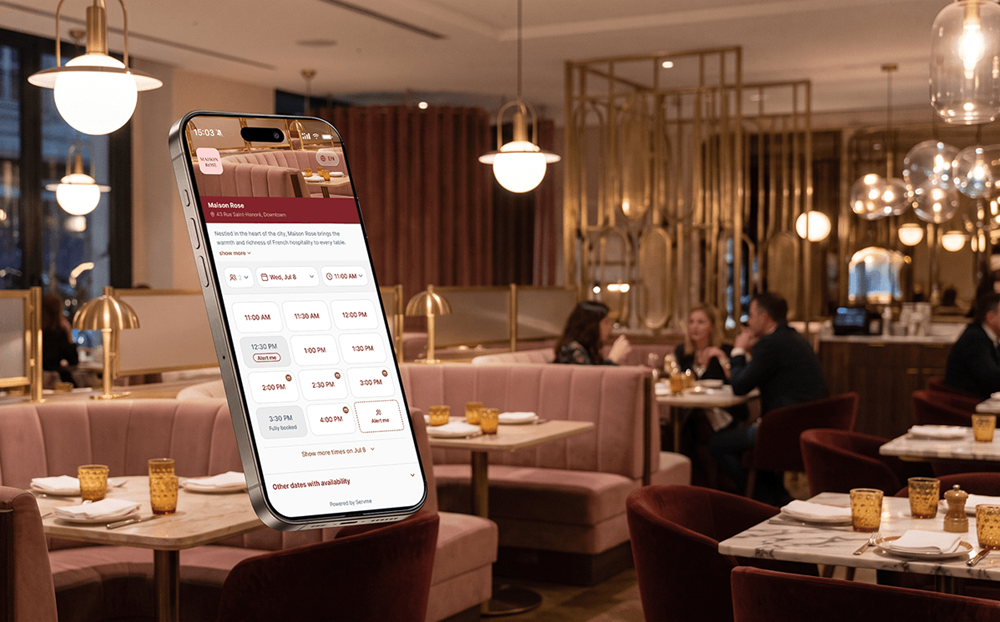
From the guest’s side, the process is direct. They search, find your listing, and see a booking option alongside your hours, photos, and reviews. Then, they select a date, time, and party size. Finally, they can add notes — dietary preferences, an occasion, a seating preference — before confirming. The booking lands in your system and they receive confirmation.
What they don’t encounter is a redirect to an unfamiliar platform, a login they didn’t expect, or a form that asks for more than your own widget would. How touchpoints affect guest decisions is often the difference between a cover confirmed and a cover lost before it ever arrives.
For hotel F&B teams, this applies to any dining concept listed separately on Google Maps. A hotel guest who searches for your restaurant by name and finds a direct booking path doesn’t have to call the front desk, call the restaurant, or navigate to a separate site. Each of those steps is a point where they can stop and decide it’s not worth it.
Deposits: Reducing No-Shows at the Point of Booking
Reserve with Google also supports reservation deposits. Guests can pre-pay or authorize payment at the point of booking, before they arrive.
For restaurants managing high-demand nights, ticketed events, or set-menu experiences, this changes the no-show calculation. A guest who has put a deposit down has a materially lower walk-away rate than one who reserved at no cost. The deposit also gives you a clearer picture of committed covers going into service.
If your Servme account has payments enabled, the Reserve with Google deposit integration is already live. No additional setup is required.
The Booking Channel Data You Own
Every reservation that comes through Reserve with Google is captured in Servme with its source labeled. You can see in your reports exactly how many covers originated from Google and compare that to your direct widget, social channels, and any other booking source you’re running.
This matters for operators running multiple booking channels. Knowing which channels drive covers, and at what volume, is the foundation of managing the restaurant customer journey before the guest arrives. It tells you where to direct guests when capacity opens, which channels to turn off when you’re full, and where a gap in your discoverability might be costing you covers you don’t know you’re losing.
The source data also tells you something useful about intent. A guest who booked through Google found you through active search. They were looking for a restaurant, not passively scrolling. That intent signal is worth tracking over time alongside your other channel data.
Reserve with Google for restaurants is a relatively straightforward integration with a measurable impact on booking channel coverage. The setup runs through your account manager, the controls sit in your dashboard, and the data comes back in your reports.
If you’d like to see how it works in practice, book a demo with Servme!